Planning consultant software, built around the planning journey
PlanProve is planning consultant software that organises each job as a site moving through the planning journey, from first appraisal and pre-application advice through submission and determination to discharge of conditions, with the checks and deadlines for each stage built in.
Every stage is a record of its own under the site, so a pre-app, the full application and the conditions that follow stay together.
Free for verified planning professionals until 3 December 2026.
What does PlanProve do at each stage?
It takes on the routine work of each stage, so your time goes on the judgement: checking constraints at appraisal, tracking the authority’s dates once you submit, and reading the decision for its conditions.
Stage 1
Site appraisal
- Add the site by address and postcode, and Site Intelligence checks it against official constraint data for England.
- See conservation areas, listed buildings, Green Belt, flood risk zones, Article 4 directions, Tree Preservation Orders and Natural England designations on a map.
Stage 2
Pre-application
- Run the pre-app as a stage of its own, with its documents and notes.
- Record the officer’s response as positive, negative or mixed, and see how your pre-apps have gone in Analytics.
Stage 3
Planning application
- Add the LPA reference, the case officer and the validation date.
- Upload the validation letter and the decision deadline is read from it for you.
- Set the statutory period: 8, 13 or 16 weeks, or a custom period.
Stage 4
Consultation and determination
- Track the consultation closing date and any extension of time you agree.
- Get an email 4 weeks, 2 weeks and 1 week before the determination date, on the day, and if it passes.
Stage 5
Decision
- Record the outcome: approved, refused, withdrawn or pending appeal.
- Reserved matters run as their own stage, with their outcomes reported separately.
Stage 6
Discharge of conditions
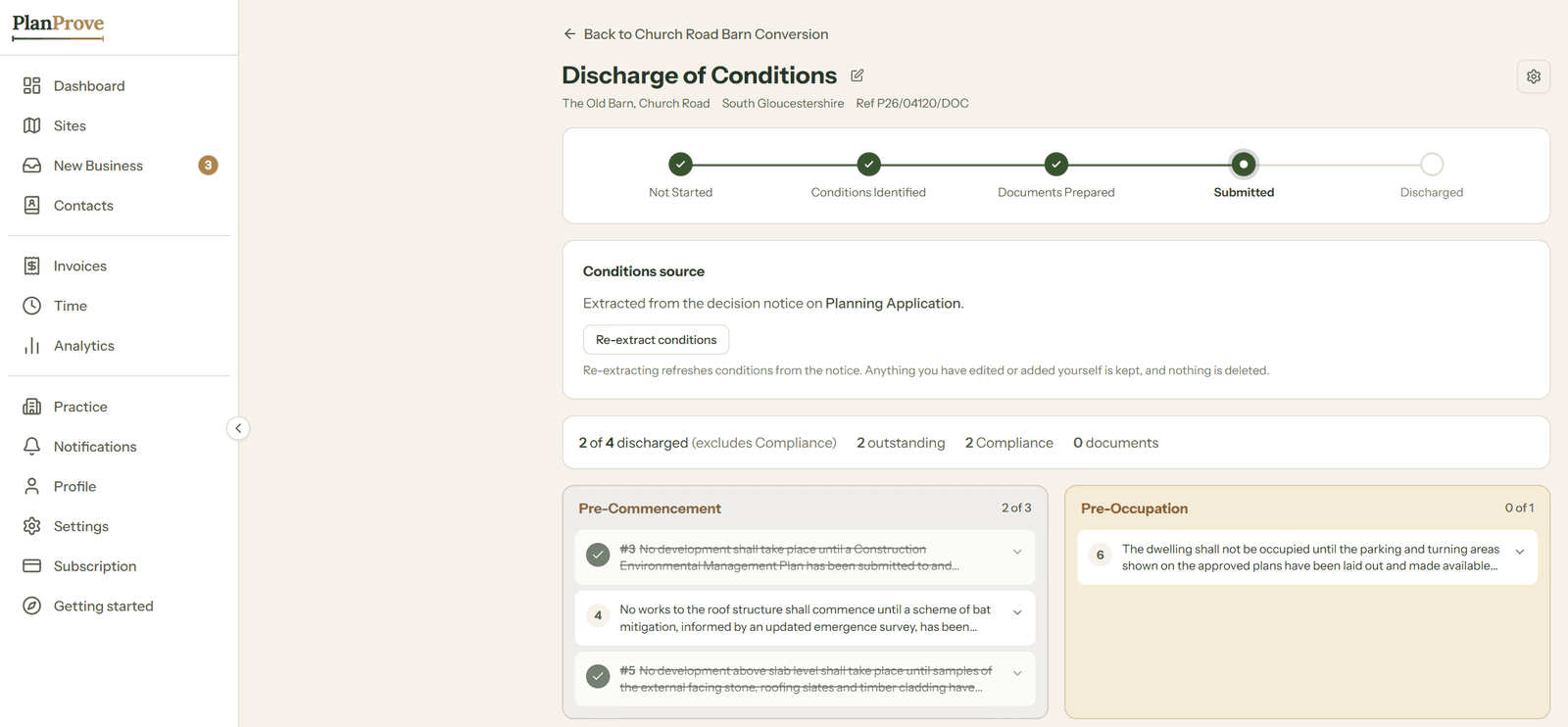
- Upload the decision notice and its conditions are extracted for you.
- Track each condition through to discharge, sorted into pre-commencement, pre-occupation and compliance.
Can it read planning documents for me?
Yes, two of them. A validation letter is read for its decision deadline, and a decision notice for its conditions, so neither has to be typed in by hand.
The AI assistant goes further. Ask it about your own sites, deadlines and documents, such as which decisions fall due this month or what a particular condition asks for, and it answers from your workspace. Check anything that matters before you rely on it, as you would a colleague’s summary.
How are several applications on one site kept together?
Each application is a stage under the same site, so a pre-app, the full application, reserved matters and the discharge of conditions all sit in one place, in order.
The pipeline board shows every site at its current stage, and flags the ones that need attention, so the whole caseload reads at a glance. If you are also managing the client side of each job, see PlanProve as a CRM for town planning consultants.
Common questions
Which application types can I track?
Full, householder, outline and reserved matters applications, listed building consent, prior approval, permission in principle, certificates of lawfulness, S73 variations, S96a non-material amendments, discharge of conditions and of planning obligations, and appeals. Anything else can be added under Other.
Do the constraint checks replace my own site appraisal?
No. They show which designations the site falls within, from official datasets, so you start the appraisal knowing what applies. The judgement about what those constraints mean for the scheme stays with you.
What if my site is not in England?
Everything except the automatic constraint checks works for any site, because the constraint data PlanProve uses covers England only. See what PlanProve covers across the UK.
Run your next application stage by stage.
Free for verified planning professionals until 3 December 2026. No card required.