The CRM for town planning consultants
PlanProve is a CRM built for town planning consultants. It tracks every enquiry, fee proposal and client alongside the planning work itself, so one record follows a job from the first phone call to the discharge of the last condition.
Sales CRMs stop at “deal won”. For a planning consultant, that is where the work starts.
Free for verified planning professionals until 3 December 2026.
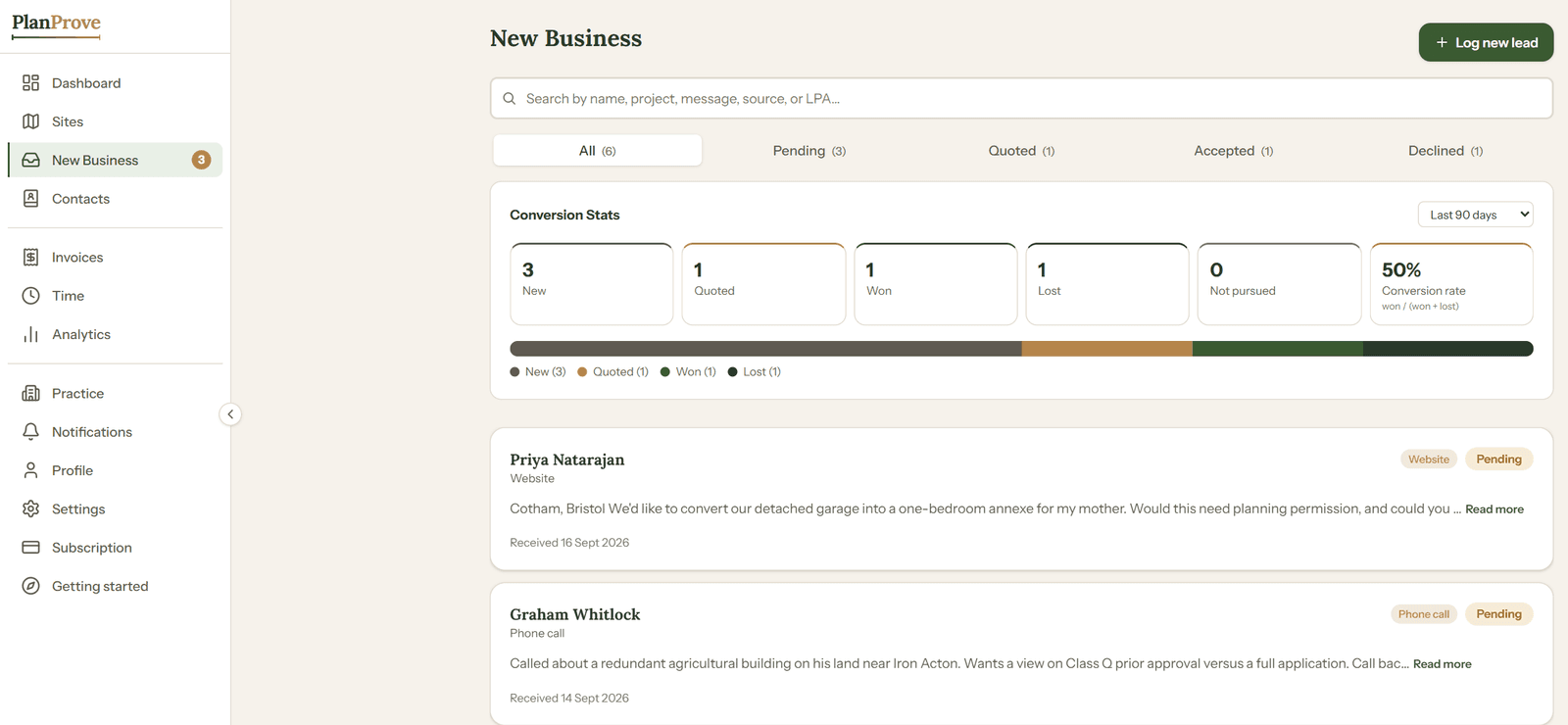
What does PlanProve do as a CRM?
It covers the five things a planning consultant needs from a CRM, and keeps them attached to the planning job rather than in a separate system.
- Capture enquiries from calls, emails, referrals and your own website intake form.
- Quote with branded fee proposals that clients accept or decline online.
- Convert an instructed enquiry into a live site in one click, with the client’s details carried across.
- Keep clients informed through a read-only view of their own site.
- Keep every specialist you work with, from ecologists to highways engineers, in one contacts directory.
How does an enquiry become a planning job?
An enquiry moves through New Business as pending, quoted, then accepted or declined, and becomes a site the moment your client instructs you.
- 1
An enquiry arrives.
Log it with “Log new lead”, or let it arrive through your intake link, an enquiry form of your own that you can put on your website or in your email signature. Note how the client found you, so you can see later which sources actually bring in work.
- 2
You quote.
Build a fee proposal from line items, as fixed fees or hourly rates, then add your scope of work and payment terms. Your client opens it on a page carrying your practice branding and accepts or declines it online.
- 3
The client instructs.
“Convert to Site” turns the accepted lead into a live site and carries the client’s details across. The same record now holds the planning stages, deadlines and documents.
- 4
You invoice.
Raise invoices from the lead and let clients pay online through your own connected Stripe account. What is outstanding and what is paid sits in one list.
- 5
You see what is working.
New Business shows how many leads were new, quoted, won, lost or not pursued over the last 30 days, 90 days or 12 months, and Analytics breaks new business down by source.
Why do planning consultants need a CRM built for planning?
Because a planning client relationship does not end when the fee is agreed. It runs through validation, consultation, determination and conditions, and a generic CRM stops tracking at the point your real work begins.
A sales CRM is built around a deal: a value, a stage and a close date. Once the deal is won, the record goes quiet. A planning job is the opposite. The record gets busier after instruction, and the dates that matter are set by the local planning authority, not by you.
PlanProve holds what a sales CRM has no field for:
- The LPA reference and the case officer
- The statutory determination date, and any extension of time you agree
- Consultation closing dates
- The conditions on a decision, tracked through to discharge
- The planning constraints on the site itself
For a side-by-side comparison, see how a town planning CRM differs from a generic CRM.
What can my clients see?
Only what you choose to show them: a read-only view of their own site, with its progress through the planning journey and the documents you have marked as visible.
- Invite a client by email. They set a password and can follow their project from then on.
- Mark each document as visible to the client, or keep it internal.
- Clients cannot edit anything, and they never see your other clients or your case notes.
That means fewer “is there any news?” emails, and a client who can see for themselves that their application is moving.
Where do my specialist consultants fit?
In Contacts, a directory of the consultants you bring in alongside your own work, filtered by discipline.
- 23 disciplines, including ecology, arboriculture, heritage and archaeology, highways and transport, flood risk, noise and acoustics, and daylight and sunlight.
- Name, organisation, email, phone and notes for each contact.
- In a practice, share a contact with the whole team, or keep it personal for work outside the practice.
Common questions
Is PlanProve a CRM or project management software?
Both, on purpose. The CRM side (enquiries, proposals, clients and contacts) and the casework side (sites, stages, deadlines and documents) share one record, because in a planning consultancy they are the same job. See how PlanProve handles the casework itself.
Can I bring in my existing clients and live jobs?
Yes. You can add sites in bulk from a CSV file, with the site address, client name, stage, LPA reference and decision deadline for each, using the template PlanProve provides.
Is it suitable for a sole practitioner?
Yes. PlanProve works for one consultant on their own. If you take on colleagues, you can set up a practice and share sites, contacts and tasks. See PlanProve for consultancies.
Can clients pay my invoices online?
Yes. Invoices are paid online through your own connected Stripe account, so payment goes straight to you rather than through PlanProve.
Can I use it with the website I already have?
Yes. Your intake link is a standalone enquiry form, so you can link to it from any website or email signature, and every submission lands in New Business ready to quote.
More on PlanProve for planning consultants
Or see every PlanProve feature and pricing.
Keep your enquiries, clients and planning work in one place.
Free for verified planning professionals until 3 December 2026. No card required.